Using local LLMs to run editing pipelines on MS Word documents
Manual style alignment of MS Word files across large technical documentation sets is time-consuming. We can conduct initial editorial passes without sending proprietary source text to external cloud APIs -- keeping your sensitive content safe and accurate.
Intended result
- A PDF report showing suggest text changes for a source MS Word document, and/or
- A Git branch with these changes ready to accept/decline/amend via a merge request.
Example
Convert the docx file:
pandoc dss_specification_draft.docx -f docx -t rst --wrap=none -o output.rst
See the result here: output.rst from the original: dss_specification_draft.docx.
Split the RST file into second-level heading files:
python _scripts/split_rst.py output.rst =
↓
Written: 1._introduction_and_purpose.rst
Written: 2._system_overview.rst
Written: 3._functional_requirements.rst
Written: 4._non-functional_requirements.rst
Written: 5._open_points.rst
Stage this original content for comparison against the analysis:
git add .
git commit -m 'staging original content for comparison'
Run our LLM processing script
python _scripts/process_files/process_files.py docs/*.rst
↓
Processing 5 file(s)...

============================================================
File: docs/1._introduction_and_purpose.rst
============================================================
Found 1 section(s) in docs/1._introduction_and_purpose.rst

[1/1] Processing: '1. Introduction And Purpose'
  ✓ Done

Complete → docs/1._introduction_and_purpose.rst (overwritten)

============================================================
File: docs/2._system_overview.rst
============================================================
Found 2 section(s) in docs/2._system_overview.rst

[1/2] Processing: '2. System Overview'
  ✓ Done
[2/2] Processing: '2.1 Key Features Of The Service'
  ✓ Done

Complete → docs/2._system_overview.rst (overwritten)

============================================================
File: docs/3._functional_requirements.rst
============================================================
Found 3 section(s) in docs/3._functional_requirements.rst

[1/3] Processing: '3. Functional Requirements'
  ⚠ Model added 7 paragraph(s) — stripping extras.
  ⚠ Heading structure changed — reverting section to original.
  ✓ Done
[2/3] Processing: '3.1 Change Detection'
  ✓ Done
[3/3] Processing: '3.2 Data Transmission'
  ✓ Done

Complete → docs/3._functional_requirements.rst (overwritten)

...
Commit and compare:
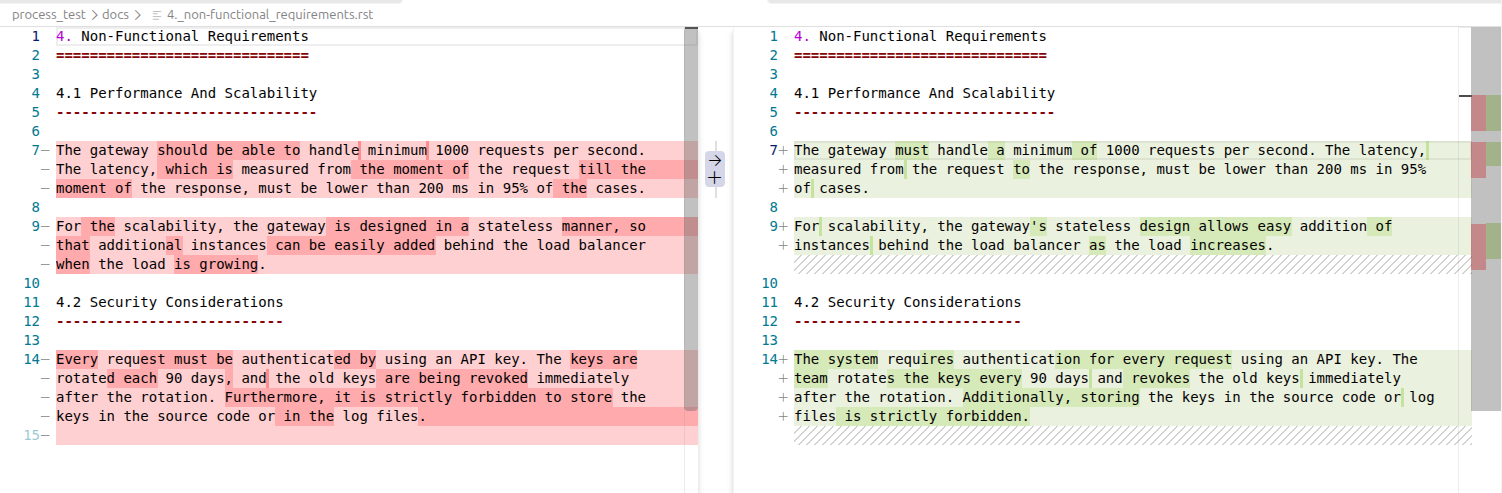
Challenges
- Reducing the text to digestible chunks to allow us to process files as needed.
- Scoping what we allow the LLM to edit.
- Ensuring we capture all the relevant text.
Background
We want to keep our proprietary technical content safe and not expose it to the internet, we also know there are some tools out there that will help us do our job more efficiently. Tools such as Ollama allow us to use open-source Large Language Models (LLMs) in a local environment such as our own computers or internal company servers.
The issue is that some of our documents are very large and exist only as single MS Word documents. An efficient workflow I've been using over the last few months consists of:
- Converting and splitting-up the MS Word document into plain-text RST file chunks (usually based on second or third level headers) via Pandoc.
- Committing this base content to a Git branch.
- Running a Python script to pass specific queries to LLM models via Ollama. This produces Git diff line-level changes on each RST file.
- Committing these suggest changes to a compare Git branch.
- Either producing a PDF analysis with the suggest changes to manually edit the original MS Word document or following through a merge request to accept/decline/amend the suggested changes directly to the RST files.
Further steps
- Refining our queries and adding functionality around terminology (via Vale).
- Adding functions to check for consistency of data or facts against itself or a larger suite of documentation.